Essential Google AI Tools for Developers (2026)
Explore Google's AI developer ecosystem in 2026: Gemini API, Stitch UI generator, Antigravity IDE, Jules coding agent, and NotebookLM for research.
Google has quietly established one of the most comprehensive AI developer ecosystems available, most of which is offered for free or with generous usage limits. In 2026, developers building side projects have direct access to the same foundational models that power Google Search, Photos, and Workspace.
Explore the specific Google AI tools available to developers working on independent projects.
TL;DR: Start with Google AI Studio for prototyping, use Stitch to generate UI. Quickly deploy using Github Pages, Netlify, Deno Deploy or Firebase. Most tools are free with generous limits.
Quick Navigation
- 🤖 AI Development Platforms, Stitch, Antigravity, Jules, Firebase Studio, AI Studio
- 🌐 Browser & On-Device AI, Gemini Nano, Chrome DevTools AI
- 🧠 Gemini API & Models, Free tier, Deep Research, NotebookLM
- 🎨 AI Creative Tools, Imagen, Veo, Nano Banana
- 🔧 Specialized AI APIs, Vision, Speech, Translation
- 🔬 Research & Experimental, Astra, Labs projects
- ☁️ Backend & Hosting, Firebase, Cloud Run, Edge Deployment
🤖 AI Development Platforms
Full-stack AI development, directly within your browser.
Stitch, AI UI Generator
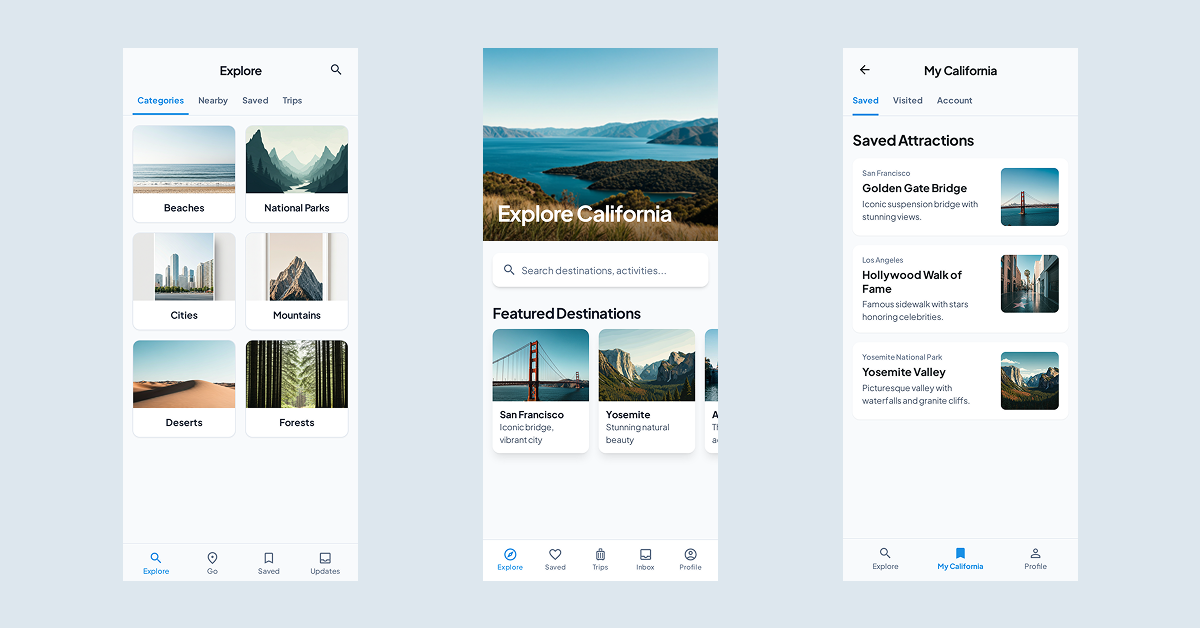
Generate complete UI designs from text prompts or sketches with Stitch, Google’s solution for developers who have a vision but lack design expertise. Launched at Google I/O 2025, it exports production-ready code directly from your prompts.
What Stitch Does:
- Text-to-UI, Describe your app, get multiple screen designs
- Sketch-to-UI, Upload wireframes, get polished interfaces
- Code Export, Clean HTML/CSS or Tailwind ready for development
- Figma Export, Paste designs directly with Auto Layout preserved
Free Tier Limits:
| Mode | AI Model | Generations/Month |
|---|---|---|
| Standard | Gemini 3 Flash | 350 screens |
| Experimental | Gemini 3 Pro | 50 screens |
Best for: Non-designers who need functional UI fast, MVPs, prototypes, and early-stage validation.
Example Prompt:
Design a cinema booking app with user registration,
movie listings, seat selection, and payment screens.
Use a dark theme with orange accents.
Pros:
- Zero design skills required
- Production-ready code output
- Figma integration for refinement
- Free with generous limits
Cons:
- Outputs can look generic without detailed prompts
- No animation or interaction support
- Image-to-UI only works in Experimental mode
Google Antigravity, Agentic IDE
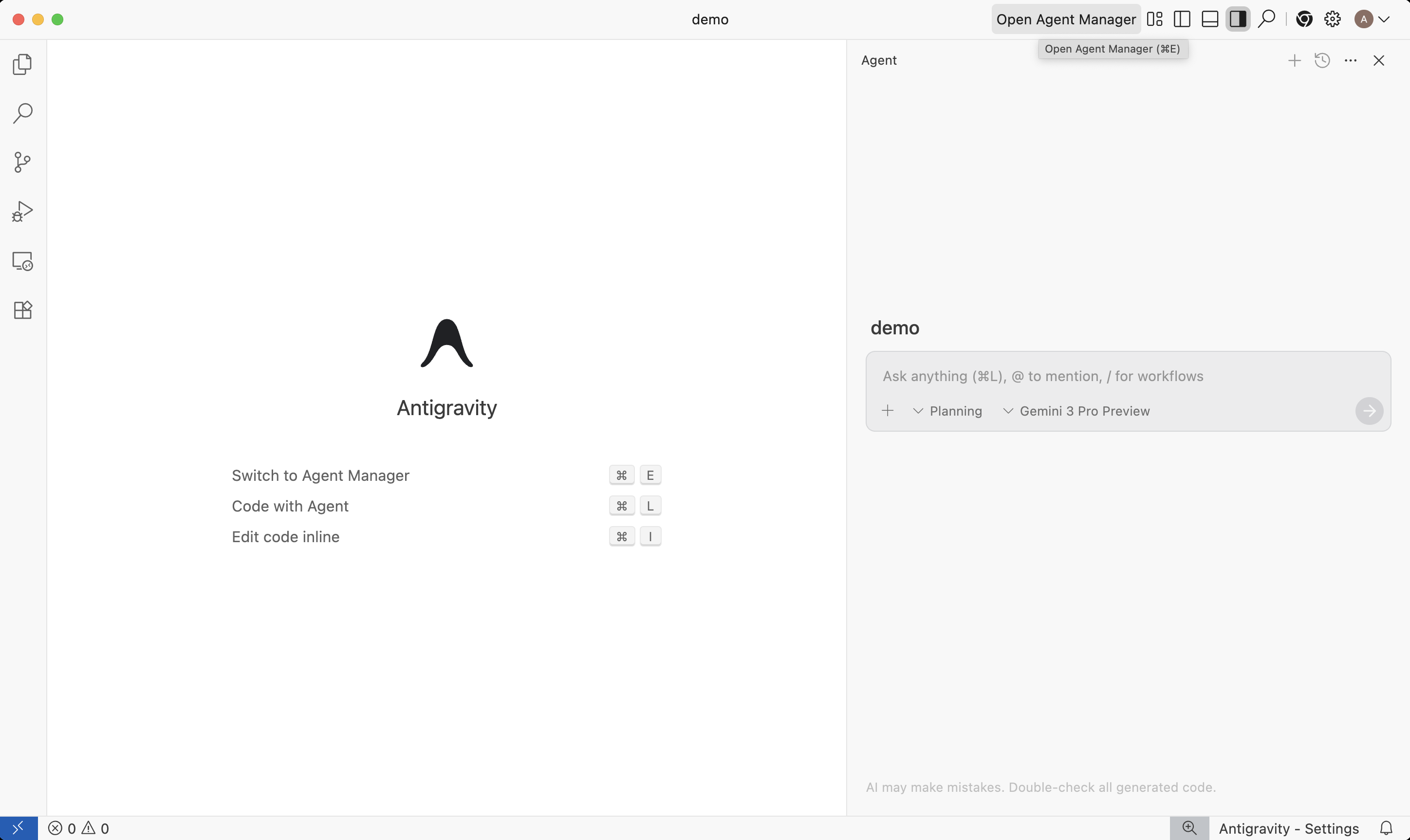
Spawn autonomous agents that plan, execute, and verify tasks across your editor, terminal, and browser with Antigravity, a comprehensive agentic development platform released in November 2025.
Two Ways to Work:
- Editor View, AI-powered IDE with tab completions and inline commands
- Manager Surface, Spawn and orchestrate multiple agents asynchronously
Installatie via Homebrew,
brew install --cask google-antigravityWhat Makes It Different:
In contrast to copilot tools that merely suggest snippets of code, Antigravity agents are designed to execute entire tasks from start to finish:
- Write code for a new feature
- Launch the application via terminal
- Open browser and test the component
- Report results via screenshots and walkthroughs
Verification via Artifacts:
Agents generate Artifacts, including task lists, implementation plans, screenshots, and browser recordings, so you can verify their progress at a glance instead of parsing through logs.
Free Tier:
- Available at no cost for individuals
- Generous rate limits on Gemini 3 Pro
- Full support for Claude Sonnet 4.5 and GPT models
Platforms: macOS, Windows, Linux
Jules, Autonomous Coding Agent

Execute complex tasks and submit them as pull requests with Jules, an autonomous, asynchronous AI coding agent that integrates directly with your GitHub workflows. Unlike a standard IDE, Jules operates in its own isolated environment.
Installatie via Homebrew,
brew install google-julesKey Features:
- GitHub Integration, Analyzes your codebase and works directly on your repositories.
- Asynchronous Execution, Runs tasks in the background so you can stay focused on other work.
- Vetted Output, Every change is submitted as a PR for your review, complete with explanations.
- Powered by Gemini 3 Pro, Leverages high-level reasoning for refactors, bug fixes, and feature builds.
Best for: Automating repetitive development tasks, large-scale refactors, and maintaining test suites without manual intervention.
Firebase Studio, Agentic Backend Development
firebase.google.com/products/studio
Firebase Studio is a cloud-based, agentic development environment that combines the best of Project IDX, Genkit, and Gemini. Build, test, and deploy full-stack AI applications with a native understanding of your Firebase services.
Key Features:
- AI-Powered Schemas, Describe your data in natural language and have Studio generate Firestore rules and TypeScript interfaces.
- Embedded Prompt Engineering, Test and version your Gemini prompts directly within your backend code environment.
- Agentic Logic, Deploy Cloud Functions that act as autonomous agents, capable of interacting with other Google Cloud services.
Gemini Code Assist, Your AI Pair Programmer
cloud.google.com/products/code-assist
Receive real-time coding suggestions, deep debugging assistance, and automatic documentation generation within your favorite IDE with Gemini Code Assist, an enterprise-grade assistant now available with a generous free tier for individuals.
Key Features:
- Full-Codebase Awareness, It understands your entire project context, offering suggestions that respect your existing patterns.
- AI-Powered Code Reviews, Catch bugs and performance bottlenecks before you even commit your code.
- Documentation Sync, Automatically updates your README and API docs as your code evolves.
Google AI Studio
Google AI Studio is your starting point for everything Gemini. It is a web-based playground for testing prompts, generating API keys, and prototyping AI features, all of which are provided free of charge.
What You Can Do:
- Test all Gemini models (including Gemini 3)
- Generate and manage API keys
- Build and save prompts
- Export code for your preferred SDK
- Access Vibe Code in Build mode for rapid prototyping
Free Features:
- Unlimited prompt testing
- API key generation
- Access to all model variants, including Gemini 3
- Code export in Python, JavaScript, and more
- Access Vibe Code in Build mode for rapid prototyping
🌐 Browser & On-Device AI
Run AI directly in the browser for privacy and speed.
Gemini Nano & Chrome Built-in AI
developer.chrome.com/docs/ai/built-in
Run AI tasks on-device without server-side costs or latency using Gemini Nano, built directly into Chrome in 2026. This integration enables developers to execute complex workloads without sending data to servers in the cloud. Aside from privacy, this also provides a faster response time as it negates the need for a network request. Mytoori’s Audio feature is an example of this though it downloads Piper TTS to do generate the audio using WASM.
Available APIs:
- Prompt API, Directly interact with the on-device model for general text tasks.
- Summarizer API, Generate summaries of web content without sending data to the cloud.
- Writer & Rewriter APIs, Assist users with text creation and refinement in real-time.
- Translation API, Real-time, on-device translation across dozens of languages.
Best for: Privacy-first applications, offline functionality, and reducing API costs for high-volume text processing.
Chrome DevTools AI, Debugging with Intelligence
Explain errors in context and receive specific code fixes directly in Chrome DevTools, powered by built-in Gemini assistance that understands your current debugging session.
Key Features:
- Console Insights, Explanations for complex errors with links to relevant documentation.
- AI Debugging Assistance, Ask DevTools to explain why a CSS rule isn’t applying or why a network request is failing.
- Performance Profiling, AI-driven analysis of your performance traces with actionable advice.
🧠 Gemini API & Models
The same AI powering Google Search, now in your app.
Gemini API Free Tier
ai.google.dev/gemini-api/docs/pricing
Access frontier models with commercial usage rights through the Gemini API free tier, remarkably generous for side projects and requiring no credit card for entry.
Free Tier Includes:
| Model | Requests/Min | Tokens/Min | Requests/Day |
|---|---|---|---|
| Gemini 3 Flash | 15 | 500,000 | 2,000 |
| Gemini 3 Pro | 5 | 500,000 | 200 |
What You Can Build:
- Chatbots with 1M+ token context
- Document Q&A systems
- Code generation tools
- Multimodal apps, including text, images, audio, and video
- Agentic workflows with tool use
Key Capabilities:
| Feature | Free Access |
|---|---|
| Text generation | ✅ Unlimited |
| Image understanding | ✅ Included |
| Audio processing | ✅ Included |
| Video understanding | ✅ Included |
| Code execution | ✅ Free |
| Grounding with Search | 500 RPD |
| Commercial use | ✅ Allowed |
import google.generativeai as genai

genai.configure(api_key="YOUR_API_KEY")
model = genai.GenerativeModel("gemini-3-flash")

response = model.generate_content(
    "Explain quantum computing to a web developer"
)
print(response.text)
Free Tier Tradeoffs:
- Content may be used to improve Google products
- Lower rate limits than paid tiers
- Some models (like Computer Use) require paid tier
Gemini Deep Research
gemini.google/overview/deep-research/
Deep Research is Gemini’s autonomous research agent. Give it a topic, and it creates a multi-step research plan, browses the web, synthesizes findings, and delivers a comprehensive report with citations.
Use Cases for Developers:
- Research competing solutions before building
- Analyze documentation across multiple libraries
- Generate technical comparisons
- Create learning resources on new topics
NotebookLM, Research & Analysis

Synthesize information from your own documents and the web with NotebookLM, an AI-powered research assistant that uses a source-grounded approach to ensure cited, accurate responses.
Key Features:
- Audio Overviews, Automatically generates podcast-style discussions summarizing your documents.
- Smart Citations, Every response includes links to the exact lines in your source material.
- Interactive Q&A, Ask complex questions about PDFs, websites, or YouTube transcripts.
- Personal Knowledge Base, Organize notes and research into distinct notebooks.
Best for: Developers researching new technologies, students, and writers who need to manage large amounts of complex information.
Gemini Canvas
Canvas is Gemini’s collaborative workspace for creating and iterating on content. Consider it a fusion of Google Docs and AI, where you can write, edit, and refine documents with real-time AI assistance.
Gems (Custom Gemini Assistants)
Gems allow you to create custom Gemini assistants with specific instructions, knowledge, and personalities. You can build a specialized code reviewer, documentation writer, or debugging assistant tailored to your specific project needs.
🎨 AI Creative Tools
Generate images, video, and more.
Imagen 4
ai.google.dev/gemini-api/docs/imagen
Google’s latest image generation model with significantly better text rendering and photorealistic quality.
Available Models:
imagen-4.0-generate-001, Standard qualityimagen-4.0-ultra-generate-001, Highest qualityimagen-4.0-fast-generate-001, Speed optimized
Pricing: Paid tier only (no free tier for Imagen)
Nano Banana (Native Image Generation)
Gemini’s native image generation feature, which integrates text-to-image capabilities directly into the model, meaning there is no separate API call required.
Available via:
gemini-3-pro-image-preview🍌gemini-3-flash-image
Free Tier: Available with standard Gemini rate limits
Veo (Video Generation)
Veo generates high-quality video from text prompts. Currently in limited preview but accessible via the Gemini API for approved developers.
Google Flow
An experimental creative tool from Google Labs for generating and editing visual content with AI assistance.
🔧 Specialized AI APIs (Legacy Cloud APIs)
Pre-trained models for specific tasks. Many of these are now being superseded by multimodal Gemini 3 capabilities but remain available for specialized high-volume workloads.
Vision & Document APIs
| API | What It Does | Free Tier |
|---|---|---|
| Cloud Vision | Image labeling, OCR, face detection | 1,000 units/month |
| Document AI | Extract structured data from documents | Limited free tier |
| Video Intelligence | Analyze video content, detect objects | 1,000 minutes/month |
Language APIs
| API | What It Does | Free Tier |
|---|---|---|
| Natural Language | Sentiment, entity, syntax analysis | 5,000 units/month |
| Translation | 100+ languages | 500,000 chars/month |
| Speech-to-Text | Audio transcription | 60 mins/month |
| Text-to-Speech | Natural voice synthesis | 4M chars/month |
Search & Agents
| API | What It Does | Free Tier |
|---|---|---|
| Custom Search JSON | Programmable search engine | 100 queries/day |
| Vertex AI Search | Enterprise search with AI | Trial available |
| Vertex AI Agent Builder | Build conversational agents | Trial available |
| Gemini File Search | Search across uploaded documents | Free with API |
🔬 Research & Experimental
Cutting-edge tools from Google Labs and DeepMind.
Project Astra
deepmind.google/models/project-astra/
Project Astra is envisioned as a universal AI assistant capable of seeing, hearing, and understanding the world around you in real-time. Currently in research preview.
MusicLM
google-research.github.io/seanet/musiclm/examples/
AI music generation from text descriptions. “A calm piano melody with rain sounds” becomes actual audio.
Colab Enterprise
cloud.google.com/colab-enterprise
Enterprise-grade Jupyter notebooks with managed infrastructure, security controls, and Vertex AI integration.
Free Alternative: Regular Google Colab remains free with GPU access.
AI Hypercomputer
cloud.google.com/ai-infrastructure
Google’s AI infrastructure stack including TPUs, GPUs, and optimized software. For when your side project becomes a startup.
☁️ Backend & Hosting
For when your AI app needs infrastructure.
Not every side project needs a backend, but when you do, Google has you covered.
Firebase (Spark Plan, Free)
The fastest path to a working backend. The free Spark plan includes:
| Feature | Free Limit |
|---|---|
| Authentication | 50K monthly active users |
| Firestore | 1 GiB storage, 50K reads/day |
| Hosting | 10 GB storage, 360 MB/day transfer |
| Cloud Functions | 2M invocations/month |
| Storage | 5 GB |
Firebase AI Logic: Integrate Gemini directly via client SDKs without managing backend infrastructure.
Firebase Studio: Cloud IDE with Gemini assistance for building full-stack AI apps.
Installatie via Homebrew,
brew install firebase-cliCloud Run (Free Tier)
Deploy any container with true pay-per-use pricing. Scale to zero when idle.
Installatie via Homebrew,
brew install --cask google-cloud-sdkFree Tier:
- 2M requests/month
- 180K vCPU-seconds
- 360K GiB-seconds
- 1 GB egress (North America)
Best for: APIs, webhooks, and any containerized workload that doesn’t need to run 24/7.
Edge Deployment (GitHub Pages, Netlify, Deno Deploy)
While Google Cloud is powerful, many AI side projects benefit from the simplicity of edge hosting. These platforms are excellent for frontend-heavy AI apps and small backends.
Recommended for:
- Static AI Apps, Hosted on GitHub Pages or Netlify, using client-side Gemini API calls.
- Serverless Backends, Using Deno Deploy or Netlify Functions to proxy API keys and handle data processing.
- Latency-Sensitive Tasks, Running logic as close to the user as possible.
Vertex AI, Enterprise Scaling
🛠️ Browser & Productivity
Tools that help you build better.
Google Lens
Visual search and understanding. Point your camera at code, error messages, or UI patterns to search or translate.
Circle to Search
On Android, circle anything on screen to search with AI. Useful for quickly researching libraries, error messages, or design inspiration.
Gemini in Workspace
workspace.google.com/products/ai/
AI features across Docs, Sheets, Slides, and Gmail. Included with Google One AI Premium or Workspace plans.
Getting Started Checklist
- Get a Gemini API key, ai.google.dev (free)
- Design your UI, stitch.withgoogle.com (free)
- Set up your IDE, Antigravity (free)
- Automate tasks, Set up Jules for your repositories
- Build your backend, Use Firebase Studio (free tier)
- Deploy, Use Cloud Run or Edge platforms like Netlify
Free Tier Summary
| Tool | What’s Free | Best For |
|---|---|---|
| Gemini API | 2,000 RPD, 500K TPM | AI features |
| Gemini Nano | Unlimited (Offline) | Local processing |
| Stitch | 350 screens/month | UI design |
| Antigravity | Full access | Agentic development |
| Firebase Studio | Full access | Backend |
| Firebase | 50K MAU, 1 GiB DB | Storage/Auth |
| Cloud Run | 2M requests/month | Hosting |
| Vision API | 1,000 units/month | Image analysis |
| Translation | 500K chars/month | Localization |
| Speech-to-Text | 60 mins/month | Audio transcription |